 AdmiralAI
An assistant that knows your fleet.
AdmiralAI is built into the Admiral dashboard. Ask about your own devices, rollouts and logs, troubleshoot a fault, or have it open the right page. It never changes anything until you click Approve.
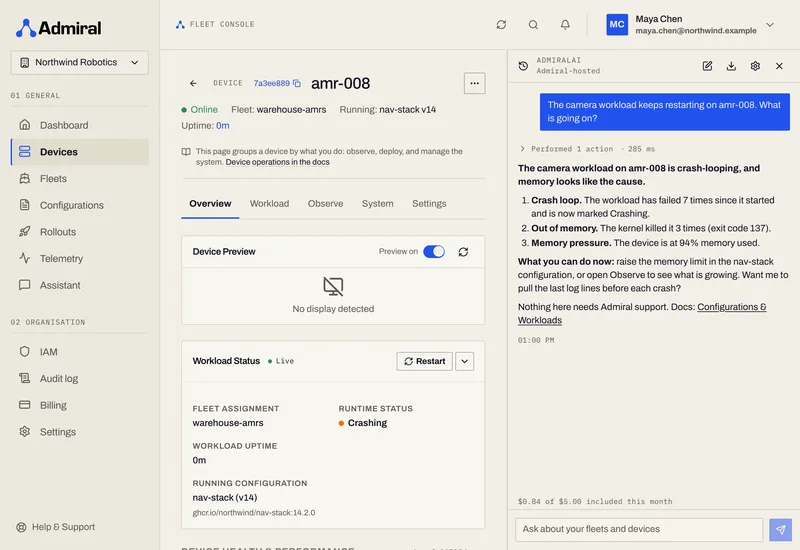
Troubleshooting
Ask what is wrong with a device.
AdmiralAI checks the device state, recent logs and events, the workload, storage, clock and connectivity, then answers with ranked findings and the evidence behind each one. You get the likely cause, what you can do right now, a link to the docs, and whether it needs Admiral support.
- “Why is amr-018 offline?”
- “The camera workload keeps restarting on amr-008. What is going on?”
- “Give me a health report for warehouse-amrs.”
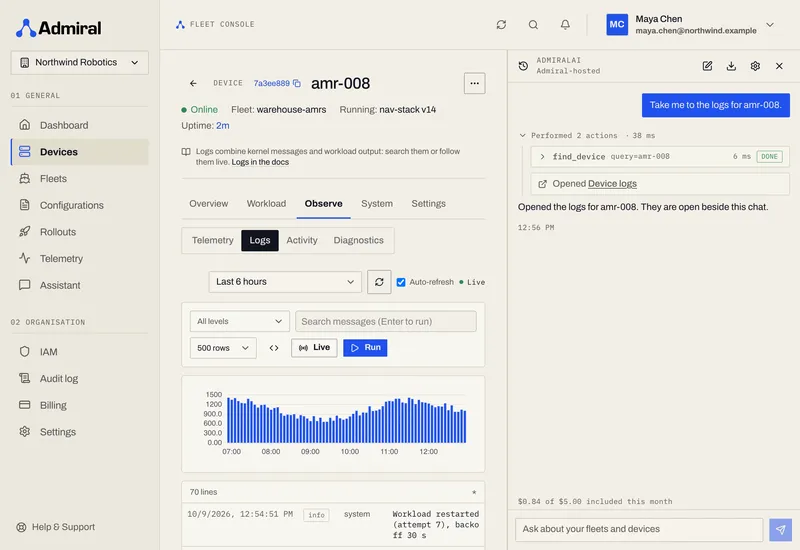
Navigation
Take me to the logs.
AdmiralAI knows which page you are on and your local time zone. Ask for “what happened overnight?” and it reads the events and logs for that window. Ask it to “take me to the logs for amr-008” and it opens the page for you.
- “Take me to the logs for amr-008.”
- “What happened overnight on the warehouse-amrs fleet?”
- “Which rollouts are still running?”
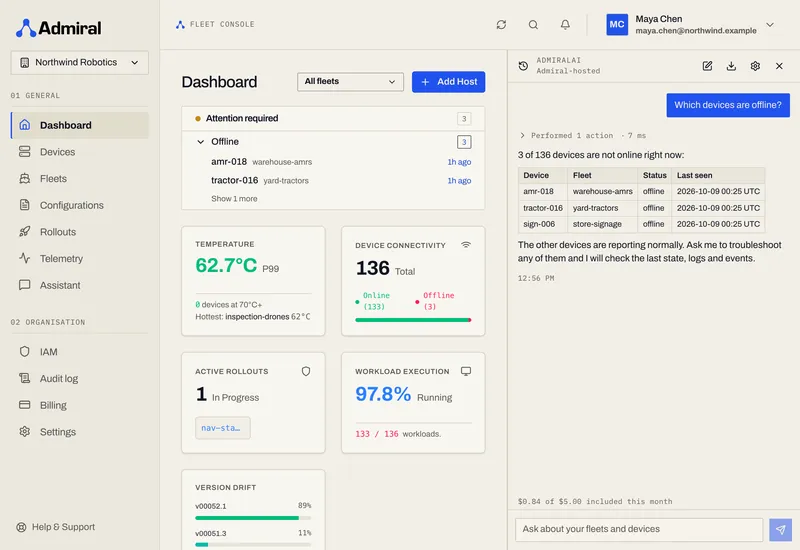
What it can see
The same data you see in the dashboard.
AdmiralAI answers from your own fleet through tools, not from memory, and it only reads what your account is allowed to see.
Devices and fleets
Status, specs, tags, hardware, network addresses and live workload state.
Configurations and rollouts
What is deployed where, and how a rollout is progressing.
Logs and events
Historical logs and lifecycle events, including for devices that are offline.
Metrics and screenshots
Health gauges, plus a live capture of the device display.
Documents
Read device, fleet and configuration documents.
Docs search
Searches docs.admrl.co and links the page it used.
Approvals and safety
You stay in charge of every change.
Reading is automatic. Changing is a decision, and it is yours.
Your permissions
AdmiralAI acts as the signed-in user. It can see and do what that person can, and nothing more.
One organisation per chat
A chat is tied to the organisation it started in. Switch organisation and you start a fresh chat; AdmiralAI cannot switch for you.
You approve changes
Rebooting a device, starting a rollout, patching a document or changing diagnostics shows as an approval card. It runs only when you click Approve.
Untrusted text stays data
Tool results and anything a device reports are treated as data, not instructions. The server validates requests strictly and only allows a fixed set of tools. This reduces prompt-injection risk. It does not remove it, which is why changes need your click.
In your browser
The tools run on your side.
The Admiral MCP server runs inside a sandboxed Python runtime in a web worker the first time you open AdmiralAI. That is a one-time download of roughly 9 MB compressed, then it is cached. Your chats are saved in your browser, not on Admiral.
- Open it
- Floating chat button, bottom right of the dashboard, or Cmd/Ctrl+J
- Layout
- Docked, resizable panel under the header; covers the page on phones
- History
- Saved in your browser per user and organisation. Rename, export, delete
- Export
- Download a chat as JSON with a note for Admiral support. It never contains your API key or session
- Rate limits
- Per-user limits on questions per minute and tool steps, plus a generous daily fair-use allowance. Very long chats ask you to start a new one
Open source MCP
Use the same tools from any MCP client.
The server behind AdmiralAI is open source. Run it next to Hermes or any other MCP client and ask the same questions from your own terminal.
- Source
- github.com/AdmrlOS/admiral-mcp, open source
- Transport
- stdio, for Hermes or any MCP client
- Auth
- A personal API token from Settings, plus an optional organisation ID
- Tools
- The same fleet, log, troubleshooting and docs tools AdmiralAI uses, except the ones that need a browser
Bring your own model
Use ours, or use yours.
AdmiralAI can run against any OpenAI-compatible endpoint. If you point it at your own, the browser talks to it directly. An http endpoint only works from an http page, because browsers block mixed content.
Pricing
$5 a month is on us.
Every organisation gets $5 of AdmiralAI usage each billing period. Past that, usage is billed per token (input, cached input, cache write and output; the per-million-token prices are shown in Billing) up to a monthly cap.
AdmiralAI, hosted by Admiral
$5 included every month
The default. No setup, no key, no model to choose.
- $5 of usage included in every organisation, every monthly billing period
- Trials and organisations without a payment method stop at the included $5
- Paid organisations continue past it, billed per token, up to a monthly cap (default $50, adjustable by Admiral support)
- Usage shows in the panel, for example “$1.20 of $5.00 included this month”, and as an “Included Assistant usage” credit on the invoice
Your own endpoint
Bring your own model
Point AdmiralAI at any OpenAI-compatible endpoint you already run or pay for.
- Enter a base URL, an API key and a model name
- Your browser calls the endpoint directly. The key and the traffic never reach Admiral
- The key stays in your browser, on this device or for the session only
- Nothing is billed by Admiral for this mode
Hosted conversations are kept for 30 days for abuse review, then deleted. See the privacy policy for how AdmiralAI data is handled.
Get started
Ask your fleet a question.
We will show you AdmiralAI on a fleet like yours.